> ## Documentation Index
> Fetch the complete documentation index at: https://docs.devdeia.com/llms.txt
> Use this file to discover all available pages before exploring further.
# Markdown Mail Theme
> Give your app's transactional emails the same cream canvas and gold accents as the panel.
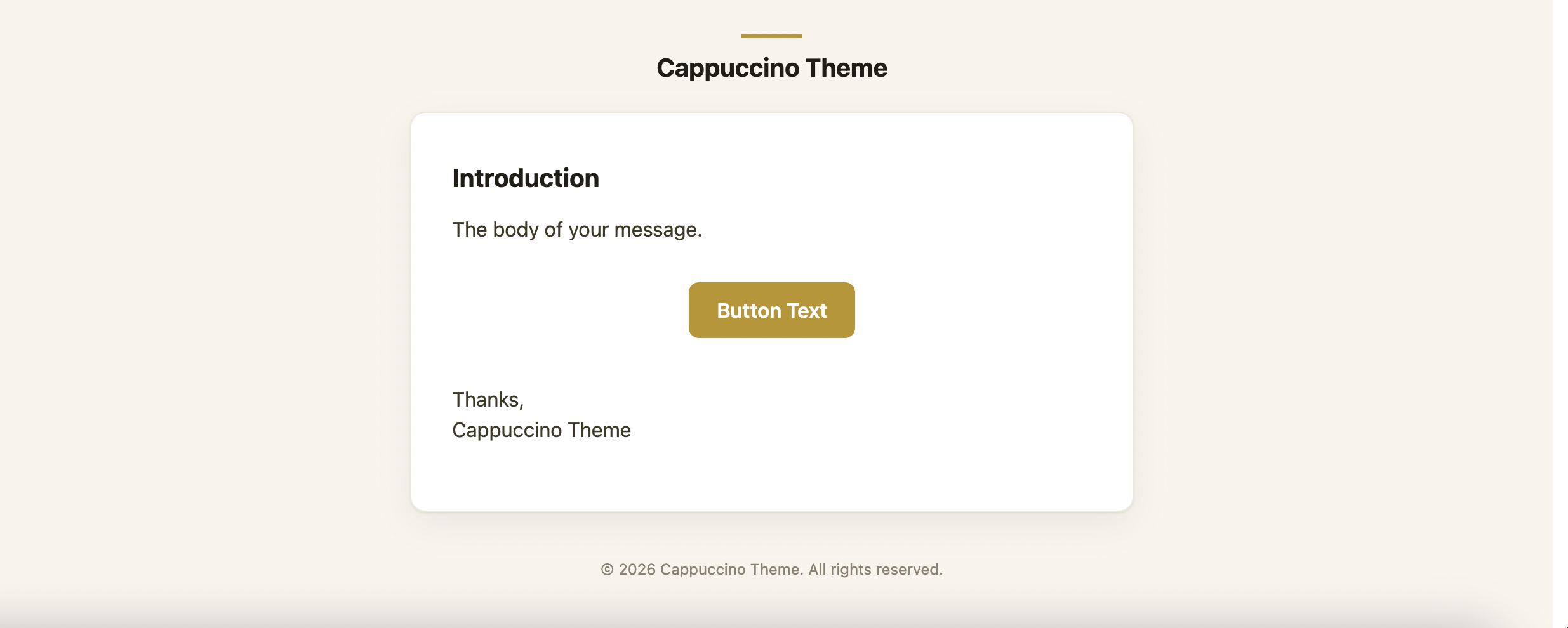 App emails can share the panel's look and feel. The installer publishes Laravel's markdown mail components (layout, header, button, panel, table, footer) plus a Cappuccino CSS theme.
## Install
```bash theme={null}
php artisan cappuccino-theme:install-mail
```
Files land in `resources/views/vendor/mail/`. The installer reads shade `600` from the plugin's primary palette — from `primaryColor()` if you've set one, otherwise the default gold.
### Command options
Filament panel ID to read the primary color from. Required when more than one Cappuccino-themed panel exists in the app.
A hex color to bake into the CSS directly, skipping panel detection entirely. For example: `--primary=#b5963a`.
Overwrite mail views that were published earlier.
```bash theme={null}
# Multiple Cappuccino panels? Pick one explicitly
php artisan cappuccino-theme:install-mail --panel=admin
# Or skip panel detection with an explicit color
php artisan cappuccino-theme:install-mail --primary=#b5963a
```
The color is written into the CSS at install time. Re-run the command after changing the panel's primary color.
## Apply the theme
Set it globally in `config/mail.php`:
```php config/mail.php theme={null}
'markdown' => [
'theme' => 'cappuccino',
// ...
],
```
Or per mailable:
```php theme={null}
return $this->markdown('mail.welcome')->theme('cappuccino');
```
## Branding
Default logos come from environment variables:
```bash .env theme={null}
CAPPUCCINO_MAIL_LOGO=https://example.com/logo.png
CAPPUCCINO_MAIL_LOGO_DARK=https://example.com/logo-dark.png
```
For tenant-specific branding, pass the same keys as view data on the mailable. They're stored with the queued job, so queued mail keeps the correct brand:
```php theme={null}
return new Content(
markdown: 'mail.welcome',
with: [
'logo' => $this->tenant->logo_url,
'logoDark' => $this->tenant->logo_dark_url,
'brand' => $this->tenant->name,
'brandUrl' => $this->tenant->url,
],
);
```
When set, `brand` replaces `config('app.name')` in the header label, footer copyright, document title, and logo alt text. `brandUrl` replaces `config('app.url')` as the header link.
## Clients and dark mode
Apple Mail, iOS Mail, and Outlook.com respect `prefers-color-scheme` and can show the dark variant — including `CAPPUCCINO_MAIL_LOGO_DARK`, when provided.
Gmail and Outlook desktop often recolor messages on their own. The light layout — cream outer background, white content card — is the reliable baseline for those clients.
App emails can share the panel's look and feel. The installer publishes Laravel's markdown mail components (layout, header, button, panel, table, footer) plus a Cappuccino CSS theme.
## Install
```bash theme={null}
php artisan cappuccino-theme:install-mail
```
Files land in `resources/views/vendor/mail/`. The installer reads shade `600` from the plugin's primary palette — from `primaryColor()` if you've set one, otherwise the default gold.
### Command options
Filament panel ID to read the primary color from. Required when more than one Cappuccino-themed panel exists in the app.
A hex color to bake into the CSS directly, skipping panel detection entirely. For example: `--primary=#b5963a`.
Overwrite mail views that were published earlier.
```bash theme={null}
# Multiple Cappuccino panels? Pick one explicitly
php artisan cappuccino-theme:install-mail --panel=admin
# Or skip panel detection with an explicit color
php artisan cappuccino-theme:install-mail --primary=#b5963a
```
The color is written into the CSS at install time. Re-run the command after changing the panel's primary color.
## Apply the theme
Set it globally in `config/mail.php`:
```php config/mail.php theme={null}
'markdown' => [
'theme' => 'cappuccino',
// ...
],
```
Or per mailable:
```php theme={null}
return $this->markdown('mail.welcome')->theme('cappuccino');
```
## Branding
Default logos come from environment variables:
```bash .env theme={null}
CAPPUCCINO_MAIL_LOGO=https://example.com/logo.png
CAPPUCCINO_MAIL_LOGO_DARK=https://example.com/logo-dark.png
```
For tenant-specific branding, pass the same keys as view data on the mailable. They're stored with the queued job, so queued mail keeps the correct brand:
```php theme={null}
return new Content(
markdown: 'mail.welcome',
with: [
'logo' => $this->tenant->logo_url,
'logoDark' => $this->tenant->logo_dark_url,
'brand' => $this->tenant->name,
'brandUrl' => $this->tenant->url,
],
);
```
When set, `brand` replaces `config('app.name')` in the header label, footer copyright, document title, and logo alt text. `brandUrl` replaces `config('app.url')` as the header link.
## Clients and dark mode
Apple Mail, iOS Mail, and Outlook.com respect `prefers-color-scheme` and can show the dark variant — including `CAPPUCCINO_MAIL_LOGO_DARK`, when provided.
Gmail and Outlook desktop often recolor messages on their own. The light layout — cream outer background, white content card — is the reliable baseline for those clients.